Skip to Content
Using AlertDAsking Questions

Asking Questions

AlertD allows you to interact with your AWS infrastructure using simple, natural language. You don’t need to write scripts or know the AWS CLI—just ask the agent what you want to know.

This guide walks you through how to ask effective questions, what kinds of prompts are supported, and tips for getting the best results.


How to Ask a Question

AlertD query interface with "Ask whatever you want" input

1. Use Plain English

You can type prompts like:

  • “Which EC2 instances are underutilized?”
  • “List all S3 buckets in us-east-1.”
  • “Show me RDS databases with high CPU.”

No special syntax required—just ask your question naturally.

2. Get Back Structured Results

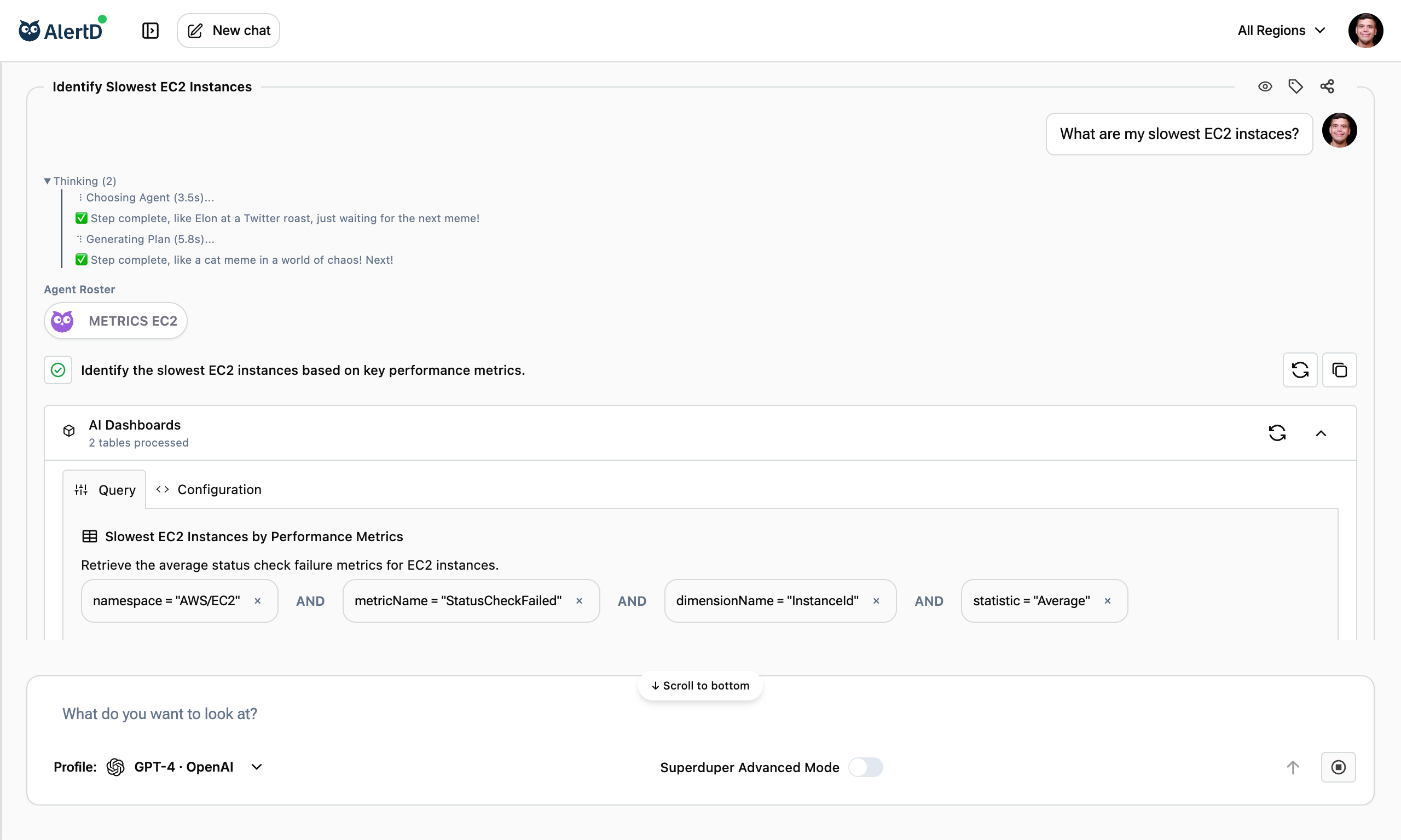
The agent runs a multi-step execution plan behind the scenes, pulling live data and transforming it into a table or summary.

What happens:

  1. Agent analyzes your question
  2. Builds custom execution plan
  3. Queries AWS APIs and CloudWatch metrics
  4. Transforms data into readable format
  5. Generates AI-powered insights

3. View the Process

You can inspect every step of the plan: from the raw API call to data shaping and LLM-based insights.

Transparency features:

  • See each step’s status (completed, failed, in progress)
  • Inspect data streams at each stage
  • Review API calls made
  • Check execution time per step

4. Use Filters and Facets

Narrow results by region, service, tag, or dimension to get more targeted answers.

Examples:

  • “List EC2 instances in us-west-2
  • “Show S3 buckets created in the last 30 days
  • “Which RDS instances with the production tag have high CPU?”

Question Patterns That Work Well

Resource Listing Questions

Simple lists:

  • “List all my EC2 instances”
  • “Show me all S3 buckets”
  • “What RDS databases do I have?”
  • “List EBS volumes”

Filtered lists:

  • “List all EC2 instances in us-east-1”
  • “Show me S3 buckets in ap-southeast-1”
  • “What RDS databases are running MySQL?”
  • “List unattached EBS volumes”

Performance Analysis Questions

Metric queries:

  • “Which EC2 instances are underutilized?”
  • “Show me RDS instances with high CPU”
  • “What’s the replication lag on my Aurora clusters?”
  • “Which instances have CPU spikes?”

Threshold-based queries:

  • “Show EC2 instances with CPU above 80%”
  • “List RDS databases with more than 100 connections”
  • “Which volumes are at max IOPS?”

Cost Optimization Questions

Waste identification:

  • “Which EBS volumes are unattached?”
  • “List idle EC2 instances”
  • “Show me EC2 instances with low CPU utilization”
  • “What resources are we paying for but not using?”

Right-sizing:

  • “Can we downsize any underutilized EC2 instances?”
  • “Which instances could move to smaller instance types?”

Security & Compliance Questions

Configuration checks:

  • “Are any of our S3 buckets public?”
  • “Show me unencrypted EBS volumes”
  • “Do we have any RDS instances without backup enabled?”
  • “Which security groups allow 0.0.0.0/0 access?”

Access reviews:

  • “Do CloudWatch logs show any ‘Access Denied’ events?”
  • “Are there IAM users with admin privileges who haven’t logged in recently?”

Troubleshooting Questions

Investigation queries:

  • “What’s causing replication lag on my RDS read replicas?”
  • “Why is my EC2 instance slow?”
  • “Show me network activity for instance i-abc123”
  • “What changed in the last 24 hours?”

Tips for Better Results

1. Be Specific About Regions

Less specific:

“List all EC2 instances”

More specific:

“List all EC2 instances in us-west-2”

Why it matters:

  • Faster execution (fewer API calls)
  • More focused results
  • Easier to act on findings

2. Include Resource Types or Metrics

Less specific:

“Show me underutilized resources”

More specific:

“Show me EC2 instances with CPUUtilization below 20%”

Why it matters:

  • Agent knows exactly what to query
  • Results are more actionable
  • Clear threshold for decision-making

3. Ask Yes/No Questions for Compliance

Effective compliance questions:

  • “Are there any unencrypted EBS volumes?”
  • “Do we have any public S3 buckets?”
  • “Are all RDS instances in private subnets?”

Why it works:

  • Clear pass/fail criteria
  • Easy to report on
  • Actionable results

4. Request Summaries for Grouped Data

Grouping requests:

  • “Show me EC2 instances by instance type”
  • “Group S3 buckets by region”
  • “Summarize RDS instances by engine version”

Why it works:

  • Easier to understand patterns
  • Better for presentations
  • Identifies distribution trends

Common Question Types

Discovery Questions

Purpose: Understand what exists in your infrastructure

Examples:

  • “What AWS services am I using?”
  • “List all resources in us-east-1”
  • “Show me everything tagged with ‘production’”
  • “What databases do I have?”

Best for:

  • New team members learning infrastructure
  • Audits and documentation
  • Inventory management

Diagnostic Questions

Purpose: Investigate issues or anomalies

Examples:

  • “Why is my RDS instance slow?”
  • “What’s causing high network traffic on instance i-abc123?”
  • “Show me error rates for my application”
  • “What changed in the last hour?”

Best for:

  • Incident response
  • Performance troubleshooting
  • Root cause analysis

Optimization Questions

Purpose: Find opportunities to improve efficiency or reduce costs

Examples:

  • “Which resources can we shut down to save money?”
  • “Show me oversized EC2 instances”
  • “What storage can we move to cheaper tiers?”
  • “Which resources are over-provisioned?”

Best for:

  • Cost reduction initiatives
  • Resource right-sizing
  • Capacity planning

Compliance Questions

Purpose: Verify adherence to policies and standards

Examples:

  • “Are all our S3 buckets encrypted?”
  • “Do we have any resources in non-approved regions?”
  • “Which instances don’t have required tags?”
  • “Are all databases backed up?”

Best for:

  • Security audits
  • Compliance reporting
  • Policy enforcement

What AlertD Understands

Service Names

AlertD recognizes common AWS service names:

  • EC2, S3, RDS, EBS, Route53
  • CloudWatch
  • IAM, VPC, ELB, ALB
  • Lambda, DynamoDB, Aurora

Tip: Use official AWS service names for best results.

Resource Identifiers

AlertD can query by:

  • Instance IDs (i-abc123)
  • Bucket names
  • Volume IDs (vol-xyz789)
  • Database identifiers
  • Security group IDs

Example:

“Show me details for instance i-0123456789abcdef”

Metrics and Dimensions

AlertD understands CloudWatch metrics:

  • CPUUtilization
  • NetworkIn/NetworkOut
  • DiskReadOps/DiskWriteOps
  • DatabaseConnections
  • ReplicationLag
  • IOPS, Throughput

Example:

“Show me CPUUtilization for all EC2 instances”

Comparison Operators

AlertD understands thresholds:

  • above, below, greater than, less than
  • over, under
  • more than, fewer than

Example:

“Show EC2 instances with CPU above 80%“


What Doesn’t Work Well (Yet)

Vague or Overly Broad Questions

Avoid:

“Tell me everything about my infrastructure”

Better:

“List all EC2 instances and their CPU utilization”

Why: Overly broad questions create massive execution plans that take a long time and may not surface what you actually need.

Multi-Part Questions

Avoid:

“List my EC2 instances and also show me S3 buckets and tell me about RDS lag”

Better: Ask separate questions:

  1. “List all my EC2 instances”
  2. “Show me all S3 buckets”
  3. “What’s the replication lag on my RDS databases?”

Why: Multiple questions confuse agent selection and plan generation. Separate questions get better results.

Questions Requiring Write Access

Doesn’t work:

“Stop all idle EC2 instances” “Delete unattached EBS volumes” “Change the instance type to t3.large”

Why: AlertD has read-only access by design. It cannot modify your infrastructure.

Alternative: Ask for the list, then take action manually:

“Which EC2 instances are idle?” → Then stop them via AWS console

Questions Outside AWS Scope

Doesn’t work:

“What’s our Kubernetes pod utilization?” “Show me my GitHub pull requests” “What’s our Datadog alert status?”

Why: AlertD currently only integrates with AWS. Other platform support is coming soon.


Key Takeaways

  • Use natural language - No special syntax required
  • Be specific when helpful - Region, service, metric names
  • Start simple, refine progressively - Build on previous answers
  • Ask one thing at a time - Better results than multi-part questions
  • Use filters liberally - Narrow down to what matters
  • Check Team Activity - Someone may have asked already
  • Follow up on results - Drill deeper with additional questions

Understanding how to ask questions effectively makes you more productive with AlertD and helps you get insights faster.


Next Steps

Last updated on