Getting Started Overview
🚀 Welcome to AlertD Setup
This guide will walk you through deploying AlertD in your AWS environment and connecting your infrastructure. The entire process takes about 25-35 minutes and consists of two main phases.
📋 What You’ll Need Before Starting
Before beginning the deployment, make sure you have:
AWS Requirements
-
AWS Account with appropriate permissions
- CloudFormation stack creation and management
- IAM role creation and policy attachment
- ECS, VPC, Elastic Load Balancing, CloudFront, Lambda, S3, Secrets Manager, and CloudWatch access
- Ability to create service-linked roles for ECS/ELB
- In an account that has never used ECS, create the ECS service-linked role before deploying (see Deployment)
Do not use the AWS account root user to deploy or operate AlertD. Create an IAM user, or assume an IAM role, that has only the permissions listed above. The root user should be reserved for account-level tasks only. See AWS best practices for the root user .
-
Supported AWS Region
- AlertD supports the following regions:
Region Group Region Codes US us-east-1, us-east-2, us-west-1, us-west-2 Europe eu-central-1, eu-north-1, eu-south-1, eu-south-2, eu-west-1, eu-west-3, il-central-1, me-central-1 Asia-Pacific ap-northeast-1, ap-northeast-2, ap-northeast-3, ap-south-1, ap-south-2, ap-southeast-1, ap-southeast-2, ap-southeast-3, ap-southeast-4, ap-southeast-5, ap-southeast-7 AlertD relies on CloudFront VPC origins, so the deployment region must support them. The CloudFormation template checks this and stops before creating anything in an unsupported region.
-
Custom Domain & SSL Certificate (Optional)
- Not required: by default AlertD is served over HTTPS on a CloudFront
*.cloudfront.netdomain, with no certificate needed - To use your own domain (e.g.,
alertd.example.com), you need a domain name you control and an ACM SSL/TLS certificate covering it - The certificate must be in
us-east-1(N. Virginia), regardless of the region you deploy AlertD to. This is a CloudFront requirement - Request a public certificate in ACM or import an existing certificate issued by a trusted certificate authority. CloudFront does not accept self-signed certificates
- Not required: by default AlertD is served over HTTPS on a CloudFront
-
LLM Provider (Optional)
- By default AlertD uses Amazon Bedrock, fully managed through AWS with no API key needed
- To use an external provider instead, have an API key ready for OpenAI (or an OpenAI-compatible endpoint), Anthropic, or Google Gemini
Authentication Provider
- A Google, GitHub, or Atlassian account for team authentication, or none at all: you can create a local admin account with an email and password and add a provider later
- The first account you create becomes the AlertD superuser and invites the rest of your team
Network Access
Your deployment and end-user browsers must be able to reach:
- auth.demo.alertd.ai over TCP 443
- api.openai.com over TCP 443 (if using OpenAI as LLM provider)
The AlertD deployment must also be able to reach:
- api.alertd.ai over TCP 443 (for auto-update, if
EnableAutoUpdateistrue)
Prerequisite Skills
Deploying AlertD does not require writing code, but the person performing the deployment should be comfortable with the following:
- AWS Management Console — navigating to CloudFormation, IAM, and EC2/VPC views.
- AWS CloudFormation — launching a stack from a template URL, providing parameter values, acknowledging IAM capabilities, and reading the Events and Outputs tabs.
- AWS IAM — understanding the difference between users, roles, and managed policies; copying an ARN; (for Advanced Setup) pasting a trust policy and attaching a managed policy.
- AWS Certificate Manager (ACM) (only if using a custom domain) — requesting or importing a certificate in
us-east-1and locating its ARN. - DNS basics (only if using a custom domain) — creating a CNAME record at your DNS provider to point a custom domain at a CloudFront hostname.
- VPC networking basics (only if using an existing VPC) — identifying private subnets and confirming NAT Gateway egress.
- AWS CLI (optional) — useful for operational tasks, but not required for initial deployment.
No programming, scripting, or container expertise is required.
🗺️ Setup Roadmap
Phase 1: Deploy AlertD Infrastructure
In this phase, you’ll:
- Subscribe to AlertD on AWS Marketplace
- Deploy the AlertD CloudFormation stack to your AWS account
- Configure networking (new or existing VPC)
- Set up the CloudFront distribution, internal load balancer and ECS Fargate services
- Add any LLM provider API keys you plan to use
Time: ~15-20 minutes
Phase 2: Choose Your Setup Path
After deployment, the setup steps depend on how you plan to use AlertD:
-
Simple Setup — If you are deploying AlertD in the same AWS account that AlertD will monitor, use the simple setup. During deployment, the CloudFormation template automatically creates the IAM monitoring role for you (via the
CreateMonitoringRoleparameter, which defaults totrue). You only need to authenticate and you’re ready to go. -
Advanced Setup — If you want AlertD to monitor a different AWS account than the one it is deployed in, you need to proceed through the advanced setup. This involves manually creating an IAM role in the target account with the correct trust policy and read-only permissions, then providing that role ARN to AlertD.
Simple Setup (Same Account)
Once deployed, you’ll:
- Access the AlertD application URL from CloudFormation outputs
- Choose how your team signs in and create the superuser account
- The monitoring role is already configured — no manual IAM steps needed
Time: ~5-10 minutes
Advanced Setup (Cross-Account)
Once deployed, you’ll:
- Access the AlertD application URL from CloudFormation outputs
- Choose how your team signs in and create the superuser account
- Create an IAM role with read-only access in the target AWS account
- Configure AlertD with the role ARN to access your infrastructure
Time: ~10-15 minutes
🏗️ Architecture Overview
AlertD deploys as a fully containerized web application on AWS ECS Fargate, inside private subnets in your VPC:
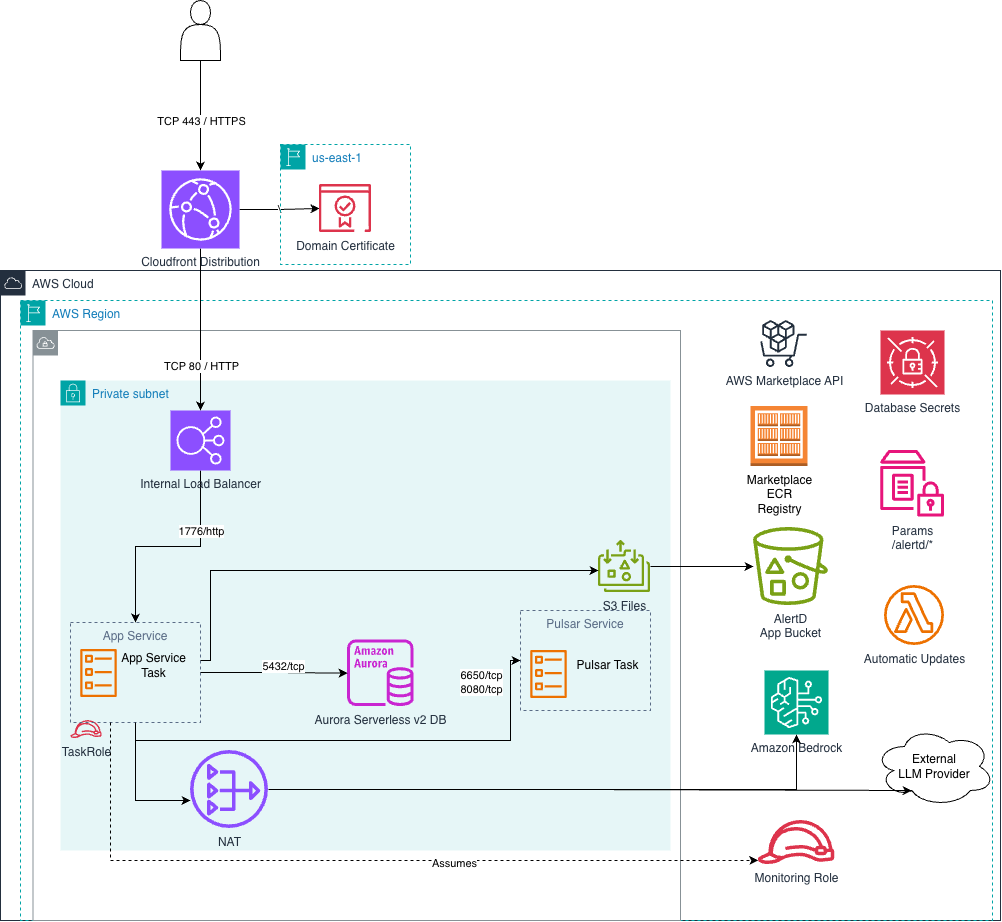
- Amazon CloudFront terminates HTTPS (TCP 443) for your users, on its default
*.cloudfront.netdomain or on your custom domain. A custom domain’s ACM certificate lives inus-east-1 - The Application Load Balancer is internal. CloudFront reaches it privately over HTTP (TCP 80) through a CloudFront VPC origin , so the load balancer and application have no public exposure. The load balancer accepts traffic only from CloudFront and rejects requests that don’t carry the distribution’s secret origin header
- The App Service task (port 1776) connects to Aurora Serverless v2 (5432/tcp), the Pulsar messaging task (6650/tcp and 8080/tcp), and S3 Files backed by the AlertD app bucket
- LLM inference goes to Amazon Bedrock by default, or to an external LLM provider through the NAT gateway if you provided an API key
- Supporting services: database credentials in Secrets Manager, parameters under
/alertd/*in SSM Parameter Store, the Marketplace ECR registry and AWS Marketplace API, and the automatic-updates Lambda function - Monitoring: the task role assumes the read-only monitoring role to read your infrastructure
🔒 Security Model
AlertD is designed with security as a top priority:
- Read-Only Access: AlertD only requests CloudWatch read permissions
- Ephemeral Credentials: Uses AWS STS tokens, not permanent access keys
- No Write Permissions: Cannot modify, change, or write to any AWS infrastructure
- Immediately Revocable: Remove the IAM role at any time to revoke access
- Encrypted Transit: All data transmission uses 256-bit encryption
- No Customer-Managed Keys Required: AlertD does not ask you to create any KMS keys or other cryptographic material. Encryption at rest is handled by AWS-managed defaults for Aurora, Secrets Manager, and EBS.
- Fargate Compute, No IMDS Exposure: The AlertD application runs on AWS ECS Fargate, which does not expose the EC2 Instance Metadata Service (IMDS). IMDSv1/IMDSv2 considerations therefore do not apply to AlertD’s compute layer.
- Standard AWS SDK Credential Chain: All calls to AWS APIs are made through the AWS SDK v3 for JavaScript, which follows the standard AWS SDK credential provider chain . On Fargate, the SDK resolves credentials from the ECS Task Role; for cross-account monitoring it then performs
sts:AssumeRoleagainst the customer role. No long-term IAM user access keys are used.
✅ Ready to Begin?
Once you have all prerequisites ready, proceed to the deployment guide. After deployment, follow the Simple Setup if monitoring the same account, or the Advanced Setup for cross-account monitoring.