Team Collaboration
The sidebar in AlertD is your real-time window into everything happening across your workspace. Whether you’re working solo or collaborating with a team, the sidebar helps you stay organized, aligned, and up to speed.
AlertD isn’t just a personal assistant—it’s a shared investigation tool that makes infrastructure knowledge visible and accessible across your entire team.
The Sidebar: Your Activity Hub
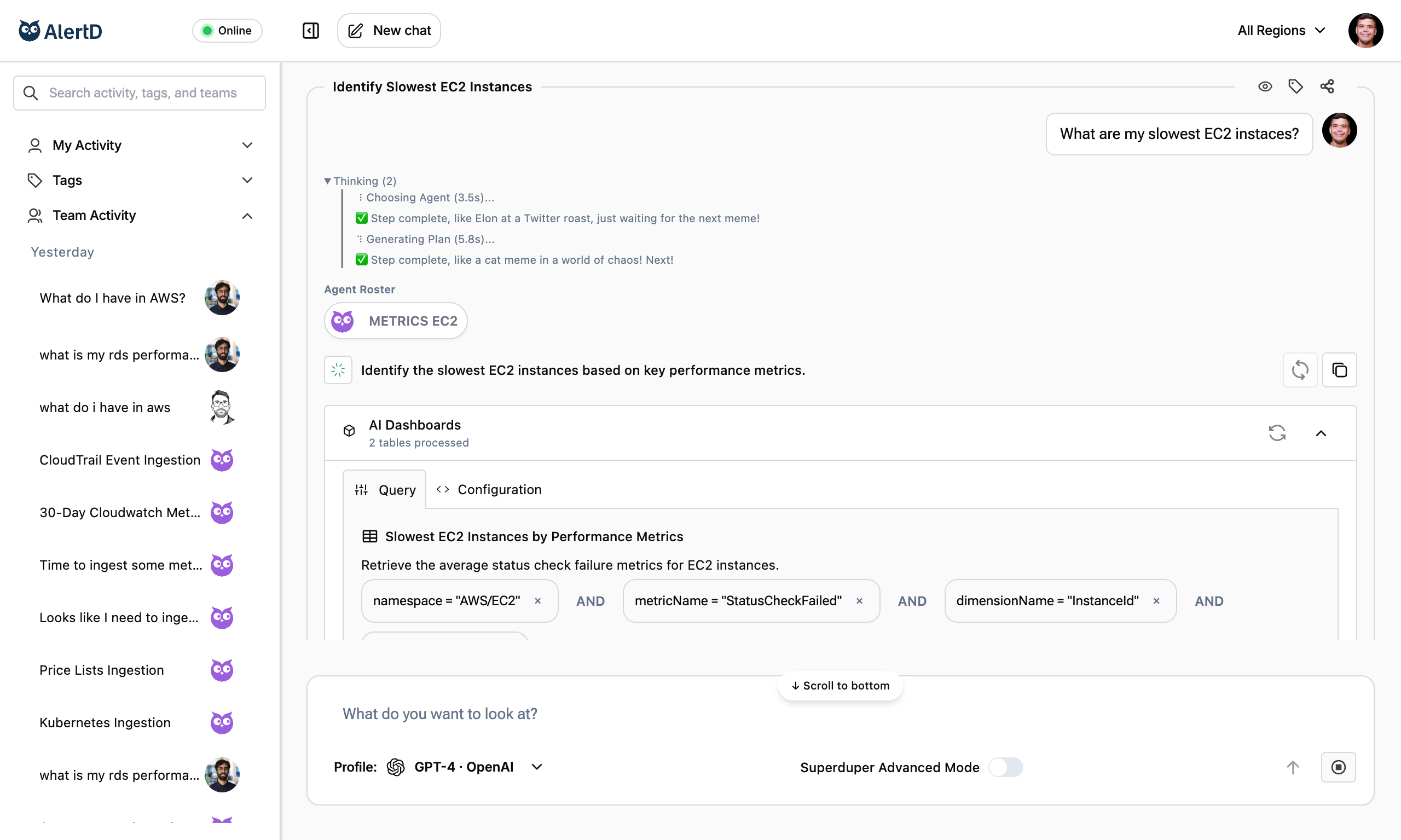
The sidebar is divided into three main sections that help you navigate your workspace:
1. My Activity
This section shows all your recent chats and agent prompts.
What you’ll see:
- Every question you’ve asked
- Timestamps for each session
- Session names (auto-generated from your question)
- Quick access to reopen previous sessions
What you can do:
- Reopen sessions – Click any session to view its full history
- Pick up where you left off – Continue previous investigations
- Review past findings – Reference earlier results
- Distinguish topics – Easily tell apart different investigations (e.g., “EBS Volumes” vs “RDS Lag”)
Session organization:
- Most recent sessions appear at the top
- Sessions are automatically named based on your initial question
- You can rename sessions for better organization
- Sessions persist indefinitely in your workspace
2. Tags
Organizational labels for categorizing and grouping related sessions.
Use cases:
- Group sessions by project
- Tag infrastructure reviews
- Organize by service (EC2, S3, RDS)
- Mark urgent vs routine investigations
3. Team Activity
This section gives you visibility into what your teammates are asking and exploring.
What you’ll see:
- Active sessions from others in your workspace
- Questions your teammates have asked
- Timestamps showing when sessions were created
- Visual avatars or agent icons associated with each session
What you can do:
- See active sessions from others in your workspace
- Learn from questions others have asked (and what they found)
- Avoid duplication of work
- Spot trends or recurring issues across your team
Privacy note:
- Team Activity is scoped to your workspace (same email domain)
- All team members see the same shared activity
- Sessions are visible to everyone in the workspace
- No cross-workspace access—your data stays private to your team
Key Takeaways
- Sidebar shows all activity – Yours and your team’s
- Team Activity enables collaboration – See and build on others’ work
- Reduces duplication – Avoid repeating investigations
- Increases transparency – Everyone knows what’s being explored
- Facilitates knowledge sharing – Infrastructure insights become team assets
- Workspace-scoped privacy – Your team’s data stays private
Understanding the sidebar and Team Activity helps you:
- Work more efficiently as a team
- Build on collective knowledge
- Avoid wasting time on duplicate investigations
- Maintain better situational awareness
- Collaborate asynchronously across time zones
Next Steps
- How AlertD Works – Understand the agent architecture behind sessions
- Execution Plans – See how each session generates and executes plans
- Understanding Results – Learn to interpret the data in shared sessions